Shipping is one of the most important pillars of any eCommerce business. Accurate shipping rates, reliable delivery, and transparent tracking directly impact customer trust and conversion rates. For Shopify store owners selling within the United States or shipping internationally, USPS and UPS are two of the most commonly used shipping carriers.
In this guide, we will explain everything about Shopify integration with USPS and UPS, including how shipping rates are calculated, which services should be used, how tracking works, legal considerations, and the complete setup process inside Shopify.
This article is written in simple language but with technical clarity, making it useful for beginners as well as advanced Shopify merchants.
What Is Shopify Integration with USPS and UPS?
Shopify integration with USPS and UPS allows your Shopify store to connect directly with both carriers so that live shipping rates, tracking details, and delivery options appear automatically at checkout.
When integrated properly, Shopify communicates with USPS and UPS systems using carrier APIs. The store sends order information such as weight, package size, and destination address, and the carriers return real-time shipping rates.
This integration helps merchants avoid flat-rate guessing and ensures customers always see accurate shipping charges.
Why USPS and UPS Are Popular for Shopify Stores
Both USPS and UPS serve different business needs, which is why many Shopify stores use both carriers together.
USPS is known for affordable lightweight shipping, while UPS specializes in heavier and faster deliveries.
Key benefits of using USPS and UPS together:
- Cost flexibility based on package size
- Reliable nationwide coverage
- International shipping availability
- Automated tracking
- Faster order fulfillment
- Reduced cart abandonment
Using both carriers allows Shopify merchants to display the most cost-effective shipping option automatically.
Difference Between USPS and UPS Shipping
Understanding how USPS and UPS differ helps you select the correct services for your store.
| Feature | USPS | UPS |
|---|---|---|
| Best for | Lightweight packages | Heavy packages |
| Domestic coverage | Excellent | Excellent |
| International shipping | Yes | Yes |
| Weekend delivery | Available | Limited |
| PO Box delivery | Supported | Not supported |
| Tracking accuracy | Good | Excellent |
| Delivery speed | Moderate | Fast |
Many merchants use USPS for small orders and UPS for large or urgent shipments.
How USPS and UPS Calculate Shipping Rates
Shipping rates are not fixed. Both carriers calculate pricing dynamically based on multiple factors.
Common rate calculation factors:
- Origin location
- Destination postal code
- Package weight
- Package dimensions
- Shipping speed
- Residential or commercial delivery
- Fuel surcharge (UPS)
- Insurance value
- International duties and taxes
Shopify sends this data automatically to USPS or UPS and displays returned rates at checkout.
Dimensional Weight Explained
UPS uses dimensional (DIM) weight heavily, while USPS applies it mainly for larger packages.
DIM Weight Formula:
(L × W × H) ÷ DIM divisor
If dimensional weight exceeds actual weight, the higher value is charged.
This is why correct product dimensions in Shopify are extremely important.
Shopify USPS Shipping Rates
USPS offers affordable shipping, especially for lightweight items.
Common USPS services used in Shopify:
| Service | Best Use |
|---|---|
| First-Class Mail | Small packages under 1 lb |
| Priority Mail | Fast domestic shipping |
| Priority Mail Express | Overnight shipping |
| USPS Ground Advantage | Economy shipping |
| International First-Class | Small global parcels |
USPS is ideal for stores selling accessories, apparel, cosmetics, and lightweight products.
Shopify UPS Shipping Rates
UPS is best suited for heavier shipments and faster deliveries.
Common UPS services:
| Service | Best Use |
|---|---|
| UPS Ground | Heavy domestic shipments |
| UPS 3 Day Select | Medium-speed delivery |
| UPS 2nd Day Air | Fast delivery |
| UPS Next Day Air | Urgent shipments |
| UPS Worldwide Saver | International shipping |
UPS rates are higher than USPS but provide excellent tracking accuracy and reliability.
USPS and UPS Locations Where Shipping Is Limited
Some locations have restrictions based on carrier rules.
USPS limitations:
- Limited service in military zones
- Restrictions on lithium batteries
- Size and weight limits
- International country bans
UPS limitations:
- No PO Box delivery
- Limited service to remote islands
- Sanctioned countries restricted
- Certain hazardous materials not allowed
Always review product shipping restrictions before enabling international shipping.
Carrier-Calculated Shipping in Shopify
To use USPS and UPS live rates, Shopify requires carrier-calculated shipping.
| Shopify Plan | Availability |
|---|---|
| Basic / Shopify | Paid add-on |
| Advanced | Included |
| Shopify Plus | Included |
Without this feature, real-time USPS and UPS rates will not display at checkout.
How to Add USPS in Shopify
Step 1: Create USPS Account
- Sign up for a USPS business account
- Request Web Tools API access
- Receive USPS API credentials
Step 2: Enable USPS in Shopify
Go to:
Shopify Admin → Settings → Shipping and delivery
- Click “Add carrier”
- Select USPS
- Enter API credentials
- Save settings
USPS rates will now appear automatically.
How to Add UPS in Shopify
Step 1: Create UPS Account
- Register for UPS shipping account
- Verify business details
- Activate billing
Step 2: Connect UPS to Shopify
- Go to Shipping and delivery
- Add UPS carrier
- Enter account number and API details
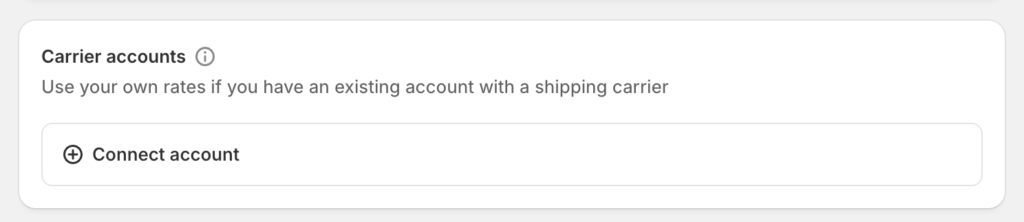
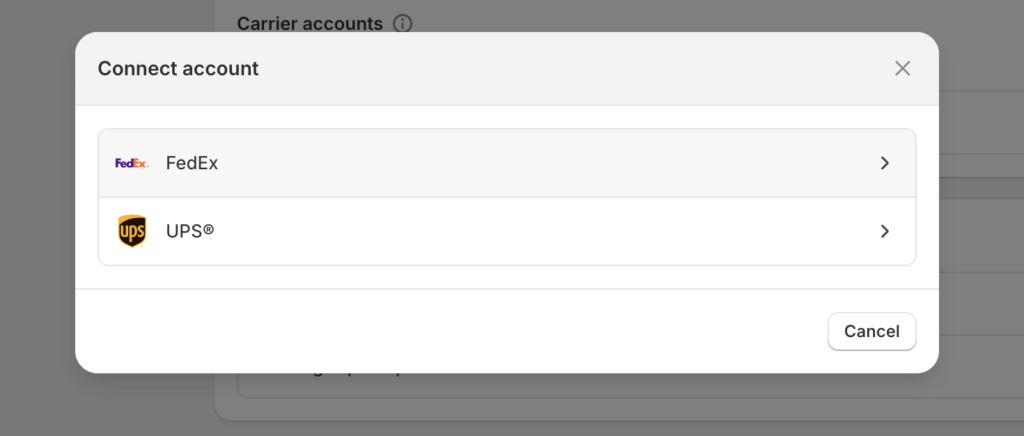
Once verified, Shopify can fetch live UPS rates.
Package Configuration in Shopify
Correct package setup is critical for accurate shipping pricing.
You must configure:
- Default box sizes
- Product weights
- Product dimensions
- Warehouse origin address
Incorrect values result in incorrect shipping charges.
USPS and UPS Tracking in Shopify
Once integrated, tracking works automatically.
Tracking features include:
- Auto tracking numbers
- Live shipment status
- Email tracking notifications
- Order timeline updates
- Reduced support tickets
Tracking links are included in customer emails automatically.
USPS vs UPS: Which Should You Use?
| Situation | Best Carrier |
|---|---|
| Lightweight items | USPS |
| Heavy products | UPS |
| PO Box delivery | USPS |
| Faster delivery | UPS |
| Lower cost | USPS |
| Better tracking | UPS |
Most Shopify merchants benefit from using both carriers together.
USPS and UPS Shopify Apps
In addition to native integration, merchants can also use shipping apps such as:
- Shopify Shipping
- ShipStation
- Shippo
- EasyPost
These apps provide:
- Bulk label printing
- Automation rules
- Multi-warehouse support
- Discounted rates
Best Practices for Shopify Shipping Setup
To avoid shipping issues:
- Always enter correct product weights
- Add package dimensions
- Test checkout with different addresses
- Enable limited shipping services
- Monitor shipping invoices
- Use shipping profiles wisely
These steps improve accuracy and reduce losses.
Common Shipping Mistakes to Avoid
- Offering too many shipping options
- Using incorrect product weights
- Ignoring dimensional pricing
- Enabling restricted services
- Not testing checkout
Avoiding these mistakes protects profit margins.
Additional Read: Shopify Integration with FedEx
Final Thoughts
Shopify integration with USPS and UPS provides a powerful shipping foundation for both small and large online stores. USPS offers affordability for lightweight items, while UPS delivers speed and reliability for heavier shipments.
When configured properly, these integrations allow Shopify merchants to display accurate shipping rates, automate tracking, and improve customer satisfaction.
Using both carriers together gives your store flexibility, scalability, and long-term shipping stability.