
Shopify Integration with FedEx – Shipping is one of the most important components of any eCommerce store. Customers expect accurate shipping rates, fast delivery, and real-time tracking updates. For stores handling domestic or international shipping, FedEx is often one of the most reliable courier partners available.
This guide explains shopify integration with fedex in complete detail — from how FedEx calculates shipping rates to which services should be enabled, restricted locations, legal considerations, and the full Shopify setup process.
What Is Shopify Integration with FedEx?
Shopify integration with FedEx allows your Shopify store to connect directly with FedEx systems using FedEx Web Services (API). This integration enables real-time shipping rates at checkout, automated tracking updates, and accurate label generation.
Once connected, Shopify sends order data such as weight, dimensions, and delivery address to FedEx. FedEx then calculates the shipping cost and returns the available services instantly.
This makes shopify integration with fedex ideal for stores shipping heavier items, international orders, or time-sensitive products.
How FedEx Calculates Shipping Rates
FedEx does not use flat shipping pricing. Rates are calculated dynamically based on several measurable factors.
FedEx Shipping Rate Calculation Factors
| Factor | Description |
|---|---|
| Origin location | Warehouse or pickup address |
| Destination | Country, state, postal code |
| Package weight | Actual product weight |
| Dimensions | Length × Width × Height |
| Shipping speed | Economy, Priority, Express |
| Delivery type | Residential or commercial |
| Declared value | Product insurance value |
| Fuel surcharge | Updated periodically |
| Customs & duties | International shipments |
FedEx evaluates all these values before returning the final rate to Shopify.
Dimensional Weight Rule (Very Important)
FedEx applies dimensional weight pricing, meaning the size of the package can cost more than actual weight.
FedEx DIM Weight Formula
| Calculation | Example |
|---|---|
| (L × W × H) ÷ DIM divisor | (40×30×30) ÷ 139 |
| Result | 259 cubic inches |
| Charged weight | Higher of actual or DIM |
If dimensional weight is higher than actual weight, FedEx charges the dimensional value.
That’s why correct product dimensions are essential in shopify integration with fedex.
Shopify FedEx Rates at Checkout
When FedEx is connected properly, Shopify automatically shows live FedEx shipping rates at checkout.
These rates:
- Update in real time
- Change based on customer location
- Reflect actual FedEx pricing
- Reduce manual shipping errors
Additional Read: Aspire Integration With Shopify
This is one of the biggest advantages of shopify integration with fedex.
FedEx Services You Should Use (Recommended)
Not all FedEx services are suitable for eCommerce. Enabling every service can cause legal and compliance problems.
Recommended FedEx Services
| Shipping Type | FedEx Services |
|---|---|
| Domestic (US) | FedEx Ground, Home Delivery |
| Fast delivery | FedEx Express Saver, FedEx 2Day |
| International | FedEx International Economy |
| Urgent global | FedEx International Priority |
These services are safe, legally approved, and optimized for Shopify stores.
FedEx Services You Should Avoid
Some FedEx services are designed for freight companies or require special government approval.
Services Not Recommended for Shopify
| Service Type | Reason |
|---|---|
| FedEx Freight | Requires freight contract |
| FedEx SameDay | License required |
| Dangerous goods | Special compliance needed |
| Alcohol shipping | Regional legal restrictions |
| Live animals | Not allowed for eCommerce |
Using restricted services may result in shipment cancellation or account suspension.
Countries & Locations Where FedEx Is Restricted
FedEx does not operate fully in all regions due to sanctions or government regulations.
Locations with FedEx Limitations
| Region | Status |
|---|---|
| North Korea | Not supported |
| Iran | Restricted |
| Syria | Restricted |
| Cuba | Restricted |
| Crimea | Restricted |
| APO / FPO | Limited support |
| Remote islands | Partial availability |
Always verify destination eligibility before offering FedEx shipping.
What Is FedEx Web Services?
FedEx Web Services are APIs that connect Shopify directly to FedEx servers.
FedEx Web Services Handle:
| Function | Purpose |
|---|---|
| Rate API | Live shipping calculation |
| Label API | Shipping label generation |
| Tracking API | Order tracking updates |
| Address validation | Delivery accuracy |
These services power the entire shopify integration with fedex process.
How to Add FedEx in Shopify (Complete Setup)
Step 1: Create a FedEx Account
You must have a FedEx business account to proceed.
You will receive:
- FedEx account number
- Meter number
- API credentials
- Billing profile
Step 2: Enable Carrier-Calculated Shipping
Carrier-calculated shipping is mandatory.
| Shopify Plan | Availability |
|---|---|
| Basic / Shopify | Paid add-on |
| Advanced | Included |
| Shopify Plus | Included |
Without this feature, FedEx rates will not appear.
Step 3: Connect FedEx in Shopify
Go to:
Shopify Admin → Settings → Shipping and delivery
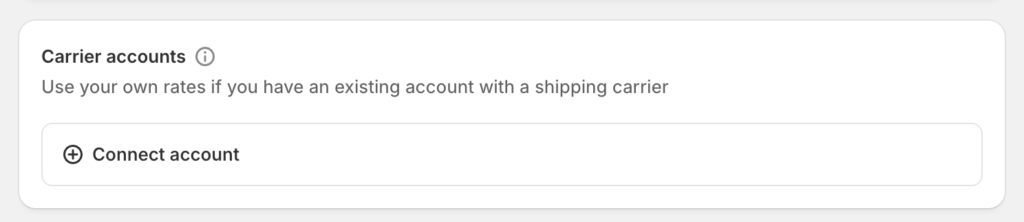
Then:
- Click “Add carrier”
- Select FedEx
- Enter account credentials
- Save and activate
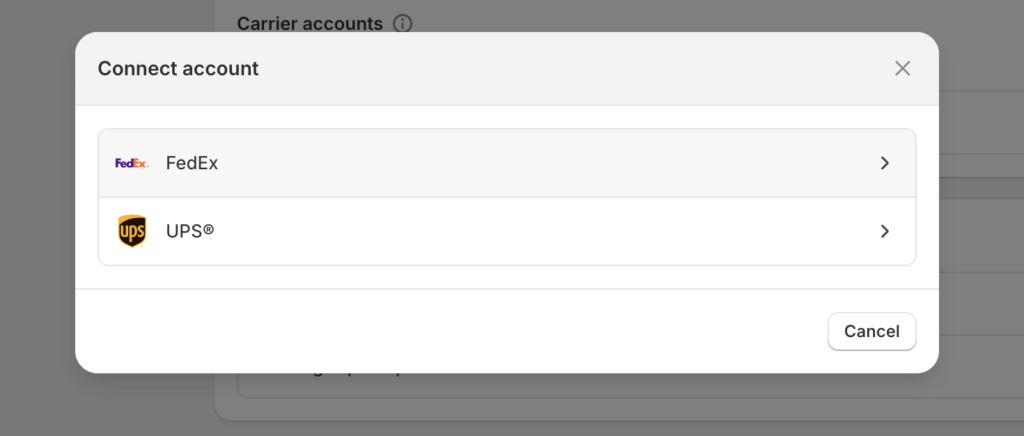
Now Shopify can fetch live FedEx rates.
Step 4: Select FedEx Shipping Services
Choose only the services you plan to offer.
Best practice:
- Select 2–4 services only
- Avoid freight options
- Keep checkout simple
Too many shipping options reduce conversions.
Step 5: Configure Package Settings
Correct configuration is critical.
| Setting | Why Important |
|---|---|
| Product weight | Accurate rates |
| Box dimensions | DIM weight calculation |
| Origin address | Distance-based pricing |
| Pickup type | Rate accuracy |
Incorrect data leads to incorrect shipping charges.
FedEx Tracking in Shopify
FedEx tracking is automatically enabled once integration is complete.
FedEx Tracking Features
| Feature | Benefit |
|---|---|
| Auto tracking numbers | No manual update |
| Order timeline updates | Customer visibility |
| Delivery notifications | Reduced support tickets |
| Tracking links | Better trust |
Customers can track orders directly from Shopify emails.
FedEx Shopify App vs Direct Integration
| Method | Best Use Case |
|---|---|
| Direct integration | Real-time rates & tracking |
| FedEx Shopify app | Label automation & bulk shipping |
Most merchants only need direct shopify integration with fedex.
Best Practices for Using FedEx with Shopify
To avoid issues and billing surprises:
- Always use accurate weights
- Add proper box dimensions
- Avoid restricted services
- Test checkout regularly
- Review FedEx invoices monthly
These practices ensure smooth long-term shipping operations.
Final Thoughts
Shopify integration with FedEx offers reliable shipping, real-time rates, and professional delivery experience. When set up correctly, it improves customer trust, reduces manual work, and supports global expansion.
However, success depends on selecting the correct services, following shipping laws, and maintaining accurate product data. When these elements are handled properly, FedEx becomes a powerful logistics partner for any Shopify store.


Thanks in favor of sharing such a nice opinion, paragraph is nice, thats why i have read it completely