Bulk pricing from Product metafields in Shopify becomes complicated when your product pricing is already managed in an ERP system like SAP. Many Shopify merchants face this challenge when moving from offline or enterprise systems to an online store. The pricing structure works perfectly in ERP, but syncing that same multi-tier pricing into Shopify often creates confusion.
In my case, the entire bulk pricing logic was configured inside SAP. Quantity breaks, wholesale rules, and special pricing tiers were already active there. However, when I tried to reflect the same pricing in Shopify, I realized that most Shopify apps are not designed for ERP-based workflows.
This is where the real problem started.
The Problem with Shopify Bulk Pricing Apps
When I explored different wholesale and volume pricing apps on Shopify, I noticed a common pattern. Almost every app expects merchants to configure pricing manually inside the app dashboard.
This approach works fine for small stores, but it fails badly for ERP-driven businesses.
The main problems I faced were:
- Pricing already exists in SAP
- Shopify apps require duplicate setup
- No automatic syncing from ERP
- Manual updates become risky and time-consuming
Even apps that claim API-based pricing still store rules internally instead of using Shopify-native data. Because of this, pricing updates coming from SAP could not sync directly with Shopify.
At this point, it became clear that I needed a solution that uses Shopify’s own data structure, not an external pricing database.
Why Product Metafields Are the Best Solution
Shopify product metafields are designed to store custom structured data. They are ideal for ERP integrations because they support JSON, can be updated through APIs, and stay permanently attached to the product.
Using metafields allows Shopify to become a frontend layer while the ERP remains the pricing authority.
This approach offers several advantages:
- ERP controls pricing logic
- Shopify only displays pricing
- No duplicated configuration
- Fully automatable via API or middleware
Once I understood this, the idea became simple — store bulk pricing in metafields and let an app read it.
Finding the Right Volume Pricing App
I tested many Shopify volume pricing apps, but most of them were either too expensive or heavily dependent on internal configuration.
Some issues I noticed repeatedly were:
- High monthly pricing
- Complex dashboards
- No metafield support
- API-only logic with no sync structure
Finally, I discovered Product Volume Pricing by MNML Apps, and it immediately stood out.
App link:
https://apps.shopify.com/product-volume-pricing
MNML Apps website:
https://mnmlapps.com/
What made this app different is its metafield-first approach. Therefore, it is better to use bulk pricing from Product metafields in Shopify for ERP systems.
Why MNML Product Volume Pricing Works So Well
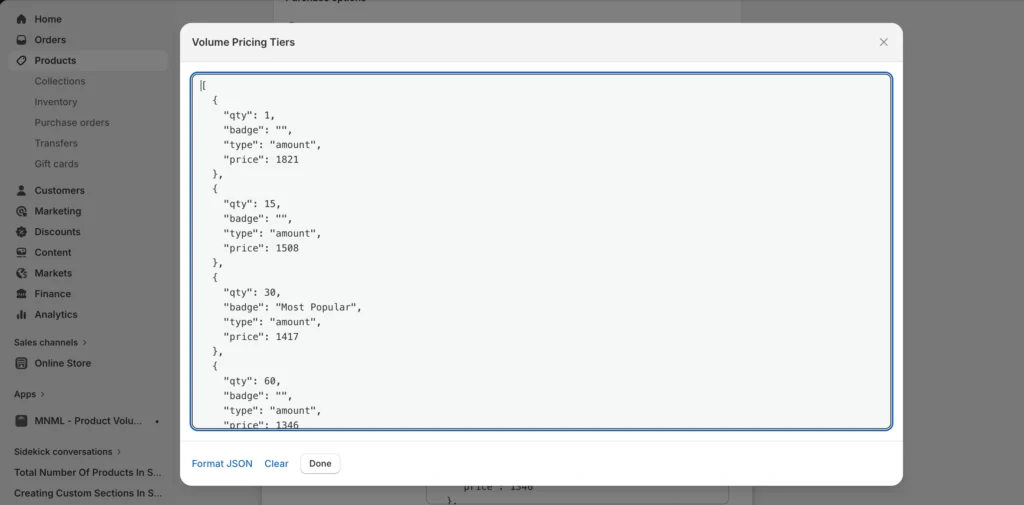
Instead of forcing pricing setup inside the app, MNML provides a dedicated product metafield where pricing is stored in JSON format.
This means:
- SAP pushes pricing data
- Metafield stores pricing tiers
- MNML app reads the metafield
- Pricing appears automatically on product pages
There is no duplication and no manual configuration required inside the app. Also you can setup the settings like to show only when a specific segment of the customer so you can do that as well.
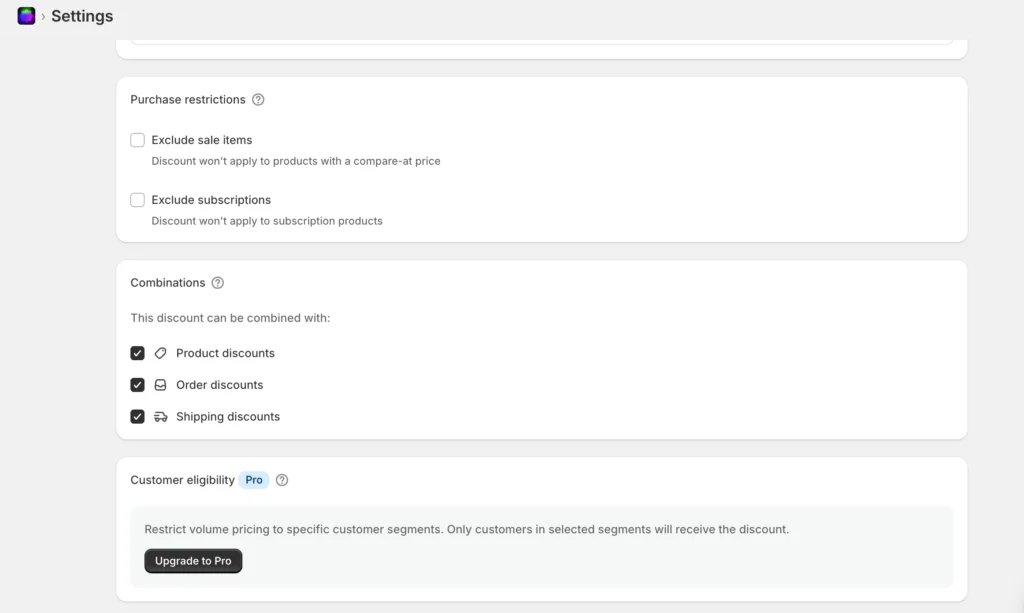
This design makes it extremely powerful for ERP-based Shopify stores.
Metafield-Based Bulk Pricing Structure
The app supports bulk pricing through JSON. This structure allows you to define multiple quantity tiers for a single product.
The pricing can be handled in two different ways:
- Amount-based pricing
- Percentage-based pricing
Both methods can be synced directly from SAP or any ERP system.
Amount-Based Bulk Pricing (Fixed Price)
Amount-based pricing is used when ERP sends the final unit price for each quantity tier.
Example JSON format:
[
  {"qty":5,"badge":"","type":"amount","price":1000},
  {"qty":10,"badge":"Most Popular","type":"amount","price":900},
  {"qty":25,"badge":"","type":"amount","price":800}
]
In this method:
- Price is fixed per unit
- Shopify does not calculate discounts
- ERP remains fully responsible for pricing
This is ideal when SAP already determines net prices.
Percentage-Based Bulk Pricing
Percentage-based pricing works best when ERP sends discount values rather than final prices.
Example:
[
  {"qty":5,"badge":"","type":"percentage","price":15},
  {"qty":10,"badge":"Most Popular","type":"percentage","price":18},
  {"qty":25,"badge":"","type":"percentage","price":20}
]
Here, Shopify calculates the discounted price dynamically based on the product’s base price.
See when you added the above data intot the metafield then after this app automatically sync and generate this type of block. How cool is this correct!
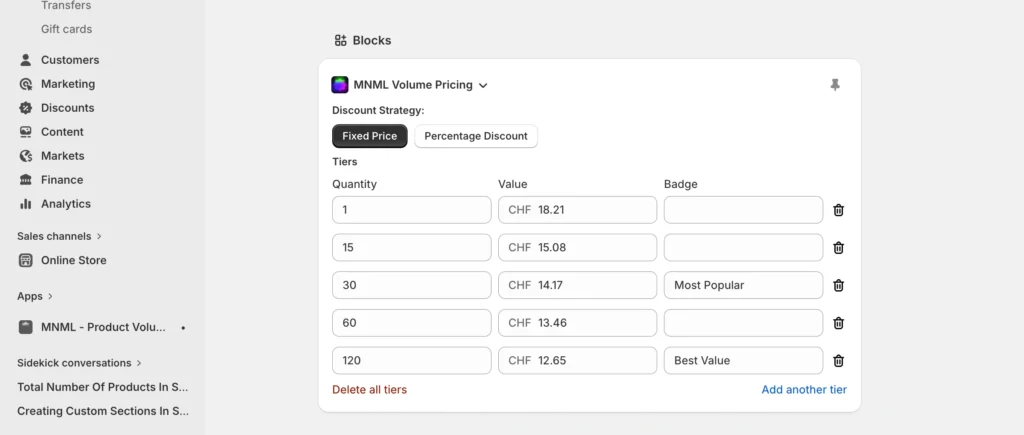
This method is useful when:
- Base prices change frequently
- Discount logic remains consistent
- ERP sends percentage rules only
Using Both Pricing Methods Together
One of the strongest benefits of this metafield-based approach is flexibility.
You can easily:
- Use amount-based pricing for some products
- Use percentage-based pricing for others
- Control everything directly from SAP
- Avoid any Shopify-side configuration
This makes the system scalable for large catalogs and frequent pricing updates.
Custom Volume Pricing Table Design
The MNML app allows full frontend customization using Liquid. You are not limited to default layouts and can build your own pricing table based on brand design.
Below is an example custom pricing table code:
{% for tier in sorted_tiers %}
  {% assign tier_price_cents = tier.price %}
  {% assign tier_price_money = tier_price_cents | money %}
  {% assign discount_cents = base_price_cents | minus: tier_price_cents %}

  <div
    class="pricing-row"
    data-tier-qty="{{ tier.qty }}"
    onclick="selectVolumeTier({{ tier.qty }})"
  >
    <div class="pricing-col">
      <span class="qty-text">{{ tier.qty }}+</span>
    </div>

    <div class="pricing-col">
      <span class="price-amount">{{ tier_price_money }}</span>
      <span class="price-unit">each</span>
    </div>

    <div class="pricing-col">
      {% if tier_price_cents < base_price_cents %}
        {% assign discount_percent = discount_cents
          | times: 100
          | divided_by: base_price_cents
          | round
        %}
        <span class="discount-tag">{{ discount_percent }}% OFF</span>
      {% else %}
        <span class="no-discount">—</span>
      {% endif %}
    </div>
  </div>
{% endfor %}
This allows you to:
- Match storefront UI
- Highlight popular tiers
- Show discount percentages
- Improve conversion rate
Additional Read: Shopify Subscription with Appstle Subscription App
Complete SAP to Shopify Pricing Flow
The full workflow looks like this:
- Bulk pricing configured in SAP
- Pricing exported via middleware or API
- JSON data stored in Shopify metafield
- MNML app reads pricing tiers
- Volume pricing displayed on product page
This approach keeps ERP as the pricing source of truth while Shopify handles presentation and checkout.
Final Thoughts
If your pricing is already managed in SAP or any ERP system, Bulk pricing from Product metafields in Shopify rebuilding that pricing logic inside Shopify apps is not scalable. Using product metafields combined with the MNML Product Volume Pricing app creates a clean, modern, and automation-ready solution.
This setup reduces maintenance, avoids duplication, and gives full control back to the ERP system — exactly how enterprise commerce architecture should work.